✻ Claude Usage
Every Claude account's limits, pace and spend — one click away in your menu bar.
curl -fsSL https://claude-code-usage.vercel.app/install.sh | bash
Paste it in Terminal: it installs the app in /Applications and opens it.
Unofficial — not affiliated with Anthropic.
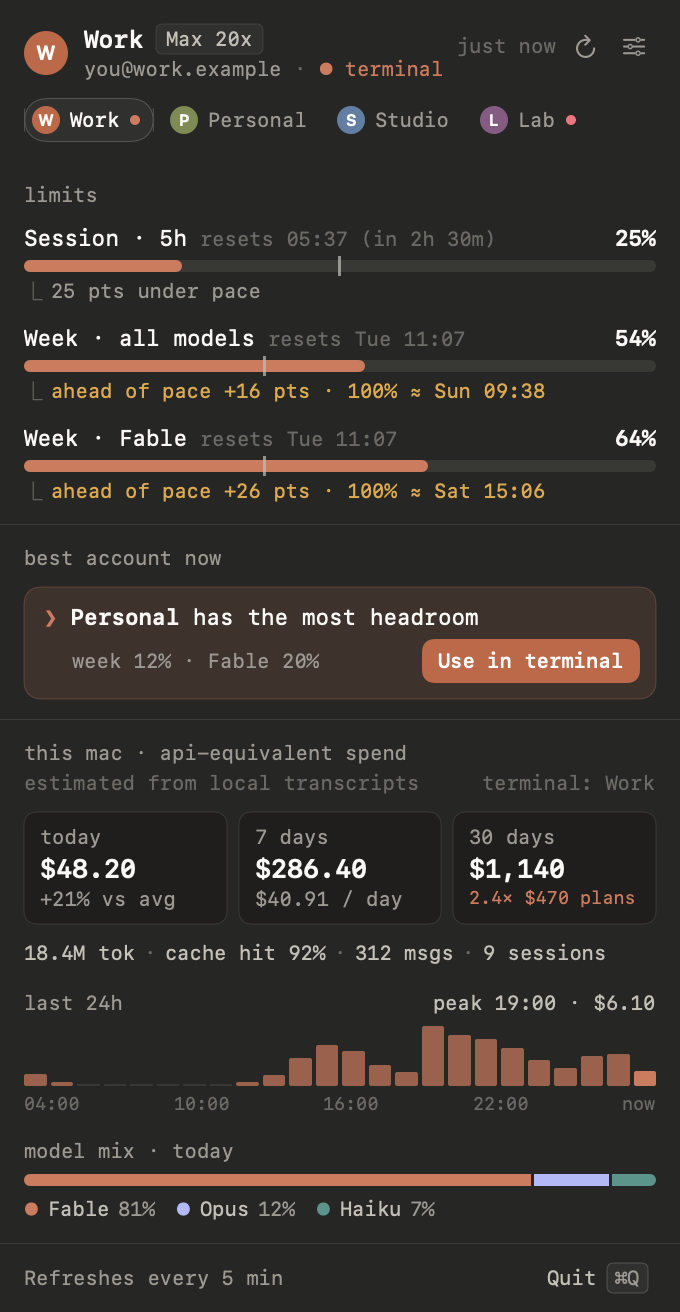
what it shows
Limits per account5-hour session, week, and week per model — with a pace marker and when you'd hit 100%.
Which account to useAdd every account with Claude Code's own login and move the terminal to the one with headroom.
Spend on this MacAPI-equivalent cost from your local transcripts: today, 7 and 30 days, models and projects.
install
Paste this in Terminal:
curl -fsSL https://claude-code-usage.vercel.app/install.sh | bash
It downloads the latest release, puts Claude Usage.app in /Applications (replacing an
older copy) and opens it. The app isn't notarized yet, but macOS doesn't quarantine what curl downloads, so it
opens without the Open Anyway step. Read the
script first if you like.
Or by hand:
- Download
ClaudeUsage.zipand unzip it. - Move Claude Usage.app to
/Applications. - First launch: open the app once, then click Open Anyway in System Settings › Privacy &
Security. Or, before opening it, run
xattr -dr com.apple.quarantine "/Applications/Claude Usage.app"
Nothing in the menu bar? Allow Claude Usage in System Settings › Menu Bar (Control Center on older macOS).
requirements
- macOS 14 Sonoma or later
- Claude Code installed and signed in at least once (
claudeon your PATH)
pairs well with
Claude Account Switcher
A Chrome extension that switches your claude.ai account in one click — sign in to the right account
there before you add it here.